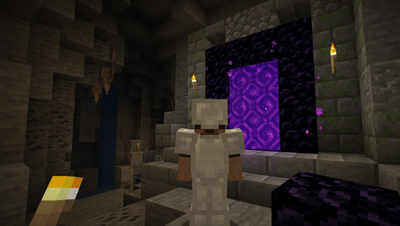
What Is Teleport in Minecraft? A Complete Guide
Teleportation in Minecraft allows players to instantly move to specific coordinates, structures, biomes or other players using the /tp or /teleport command. It is available in both Java and Bedrock Editions when cheats are enabled.
Whether you want to reach your base quickly join a friend on a multiplayer server or explore distant locations teleport commands make travel faster and more convenient.
How to Teleport in Minecraft
- Enable cheats in your world settings.
- Open the chat window.
- Type the teleport command: /tp x y z
- Replace X, Y, and Z with your destination coordinates.
- Press Enter to teleport instantly.
Definition and Purpose
Teleportation allows players to instantly travel from one location to another using commands coordinates or special game mechanics. It is one of the fastest ways to explore large worlds and play with friends on multiplayer servers.
Why Players Use Teleport (Travel, Multiplayer Convenience, Exploration)
Teleportation saves time by allowing players to instantly travel across the world instead of walking long distances. It is especially useful for multiplayer servers exploration and returning to your base quickly.Multiplayerconvenience drives another corefunction: join any friend’s world and instantlyjump to specificCoordinates. Exploration becomes faster, more controlled teleport to locate distant structures rather than spend hours navigating blindly.
Requirements for Teleporting in Minecraft
- Enabling cheats within world settings is the first non negotiable step without this, the chat window remains locked against any commands even in single player survival worlds.
- Entering accurate X, Y, Z values determines whether your destination lands safe or inside lava, deep caves, or oceans careless teleportations into unknown places beneath high mountains remain genuinely risky without prior terrain knowledge.
- Carrying proper gear food, weapons, tools, and protection prepares you for whatever spawns nearby upon arrival.
- A stable internet connection helps reduce lag during teleportations, preventing dangerous mid transfer glitches on busy Minecraft servers.
Teleport Commands in Minecraft
| Command | Purpose |
| /tp x y z | Teleport to coordinates |
| /tp Player1 Player2 | Teleport one player to another |
| /tp @a x y z | Teleport all players |
| /locate village | Find nearest village |
| /locatebiome biome_name | Find a biome |
The Basic Teleport Command (/tp or /teleport)
Most players discover the basic forms of instant travel through trial the shorter /tp and full /teleport command share identical functions. Understanding both helps you perform common teleportation confidently across any Minecraft world.
Syntax and Parameters (Player, Coordinates, Targets)
The teleport command uses a specific syntax where player name, X, Y, Z coordinates and target location serve as core parameters letting you move yourself another player or multiple players across any game world instantly.
Differences Between Java and Bedrock Editions
The Java Edition supports advanced command parameters with complex targeting for entities monsters and items while Bedrock Edition offers simpler command syntax with fewer special symbols, making it ideal for phones and tablets.
How to Teleport to Coordinates?
In Minecraft, use the /tp command followed by X, Y, Z values to reach any specific location. X indicates East or West, Z covers North or South and Y defines height. Press enter after typing to instantly teleport your player.
Teleporting Yourself to Specific Locations
Using /tp, you can teleport yourself to any specific location instantly. Enter X, Y, Z coordinates carefully the Y coordinate controls height. Stay low to avoid lava. This command works without a player name.
Teleporting Other Players to Coordinates
When cheats are enabled on your server the command syntax /tp lets admin accounts teleport other players to any specific location. Simply type /tp player name X Y Z like Steve 5000 75 -200 to move them instantly to that Coordinate.
How to Teleport to Players / Teleporting to Another Player
In multiplayer servers, the /tp command offers remarkable convenience by letting you move instantly to a target player. Simply type the command syntax using your name and the player name to teleport to their exact location.
Teleporting Someone to You
Using the /tp command with proper syntax lets you pull any player to your location instantly. Enter /tp Alex Bob or use your name as a parameter to move them in reverse order.
Teleporting Multiple Players
In multiplayer servers, the command /tp @a shifts all players to exact X, Y, Z coordinates instantly. Using the special selector symbol targets every player by name, making multiple teleport actions seamless.
How to Teleport to Structures and Biomes
Mastering /locate reveals the nearest Stronghold, Woodland Mansion or village structure instantly. Combined with /tp and X, Y, Z Coordinates your exploration becomes surgical jump to any biome name or output safe spawn using Java Edition command precision.
Teleporting to Villages
To teleport to a village, type the /locate command in the chat. The game output shows X and Z coordinates of the closest structure. Use /tp @s with a safe Y coordinate to reach the nearest location instantly.Example:
Teleporting to Biomes (Java Edition with /locatebiome)
In Java Edition, the /locatebiome command pinpoints any biome by name instantly. Enter /locatebiome minecraft:cherry grove to retrieve X and Z coordinates, then use the /tp command to teleport and find specific biomes effortlessly.
Teleporting to Structures (Woodland Mansion, Stronghold, etc.)
Using the /locate command, you can teleport directly to hidden structures like a Stronghold or Woodland Mansion. Simply get the Coordinates returned then use /tp to arrive instantly at that example structure.
Special Teleport Locations
Knowing teleportation shortcuts transforms gameplay entirely. Your Spawn point, Bed location and Death spot serve as important anchors across dimensions the Overworld, Nether and End each demand strategic positioning before venturing further.
Teleporting to Spawn Point
Using the /tp command, you can teleport your character back to the world’s initial spawn point instantly. Simply use /tp @s 0 70 0, targeting coordinates X=0, Z=0, to return without delay.
Teleporting to Your Bed
Your bed acts as a saved spawnpoint using the /spawnpoint command locks coordinates precisely. The /tp command can return you direct to those set coordinates teleporting instantly without hunting your base again.
Teleporting to Last Death Location (Mods/Commands)
In Minecraft, your death location isn’t directly recoverable via any official standard command, but mods and multiplayer server plugins make teleporting back seamless a common workaround seasoned players across servers quietly rely on.
Teleporting Between Dimensions (Overworld, Nether, End)
In JavaEdition, the /executecommand unlocks true dimensional travel. Using /teleport with specifiedcoordinates players jump between Overworld, Nether and Enddimensions seamlessly. BedrockEdition handles each dimensionportal transition differently than expected.
How to Use Teleport in Different Versions
Teleport mechanics in Minecraft aren’t universal Java and Bedrock Edition each behave differently. Consoles like Xbox, PlayStation and Nintendo Switch require cheats enabled through world options while the /tp command stays precise across all targets.
Teleport in Java Edition
The Java Edition teleport command offers flexibility with precise targeting through special selector symbols enabling complex command parameters for seamless teleportation. Consult the wiki for advanced syntax experienced players rarely overlook these mechanics.
Teleport in Bedrock Edition
The Bedrock Edition features a simpler teleport command system letting player targets reach exact Coordinates instantly. This teleportation capability works seamlessly across phones and tablets, making precise movement effortless for mobile users everywhere.
Minecraft Bedrock Edition supports teleport commands on mobile, Windows Xbox, PlayStation and Nintendo Switch when cheats are enabled.
Teleport on Consoles (Xbox, PS4/PS5, Switch)
On Xbox, PlayStation, and Nintendo Switch teleport mechanics require cheats enabled during world creation. Access the chat window enter the /tp command, and instantly relocate a feature spanning all major console versions.
Advanced Teleportation Methods
Advanced builders use command blocks to create automated Redstone circuits, enabling custom teleporters that instantly move players between challenge areas. A pressure plate or button triggers teleport requests, while multiplayer servers utilize Essentials /tpa, /sethome, and permissions plugins for seamless experiences.
Using Command Blocks for Teleportation
Command blocks are essential tools that instantly move players across worlds. Trigger one via pressure plate or button, running /tp @p to teleport the nearest player to coordinates X=100, Y=65, Z=200, enabling custom experiences.
Creating Custom Teleporters with Redstone
Redstone circuits paired with command blocks let you build custom teleporters that move players across rooms challenge areas or multiplayer servers setups most builders overlook despite their transformative potential in creative map design.
Teleportation in Multiplayer Servers (Plugins, Permissions)
On multiplayer servers, teleportation transforms navigation entirely. Plugins like Essentials grant players structured permissions controlling who executes commands. Using /tpa a teleport request system emerges, while /sethome anchors personal waypoints across large server networks.
Tips and Tricks for Teleporting
- Most players never realize that mastering teleport mechanics begins with understanding Y Coordinate awareness.
- Before you jump dimensions or reach the Nether, always verify your Y level to avoid landing inside solid ground or fatal lava pools.
- Experienced survivors use the /locate command to pinpoint a Woodland Mansion or Stronghold before traveling.
- This makes exploration faster and far more efficient across the End, open areas, and beyond.
Conclusion
Teleportation is one of Minecraft’s most useful features for travel, exploration and multiplayer gameplay. By learning basic commands like /tp, /locate and /locatebiome, players can move around the world quickly and efficiently.